Weather Forecast - Live Alerts
- 4.7
- Rating
- 1.00M
- Installs
- Free
- Price
 Analysis by App-foxy
I have lost count of how often I have checked the weather, left home, and then discovered that the forecast I saw was too vague to help. A broad “partly cloudy” label does not answer the questions that matter in real life: Should I carry an umbrella for the walk to the station? Is it sensible to plan a lunch outside? Will a jacket be useful later, or will it simply become something I have to carry all day? Weather Forecast - Live Alerts is built around that everyday decision-making problem. It is a free weather app from RODRIGUEZCASTILLO FABIOLA, and its purpose is straightforward: give me a quick view of conditions before I commit to leaving home.
After using it as a practical weather check rather than treating it like an entertainment app, I found its main appeal easy to understand. It reduces the small amount of uncertainty that causes repeated checking, last-minute changes, and unnecessary packing. That sounds modest, but it is exactly where a weather tool earns its place on my phone. I do not need a complicated dashboard every time I open an app. I need information that is easy to interpret when I am already late, standing by the door, or deciding whether a plan is worth keeping.
Why a quick forecast matters more than a crowded weather screen
The usual alternatives tend to fall into two groups. Some phone users rely on the built-in weather widget, which is convenient but can feel too limited when they want a fuller look at the day. Others install large weather services filled with maps, radar layers, warnings, charts, and extra sections. Those tools can be excellent for detailed planning, but they also create a different problem: I spend time navigating the forecast instead of using it.
You May Also Like

 Blood Strike: 2.5 Anniversary
Blood Strike’s Loadouts Turn Every Drop Into a Tactical Gamble
A close look at Blood Strike’s custom loadouts: how fast access to signature weapons reshapes its battle royale rhythm, rewards preparation, and narrows the gap between fights.

 Pandora - Music & Podcasts
Pandora’s Music Is Easy to Start, but Harder to Recover
Pandora’s strength is its low-effort path from a seed to a station. Its weak spot is how much confidence it asks you to place in connection, setup, and quiet recovery.

 8 Ball Pool
 Is Built on Rivalries, Rematches, and Routine
A close look at the rivalries, rematches, shared routines, and unanswered safety questions that turn a quick pool match into a persistent mobile community.

 Samsung Music
’s Quiet Strength Is Playing What You Already Own
Its reach comes less from spectacle than from dependable access to a personal library. That simplicity is both the app’s strongest retention engine and its ceiling.

 AccuWeather: Weather Radar
AccuWeather Review: A Quick, Clear Forecast for Everyday Decisions
For everyday plans, the best forecast is the one you can understand quickly. AccuWeather makes rain timing, radar, and local conditions easy to act on, with a few trade-offs.

 Hill Climb Racing
Why Hill Climb Racing Still Turns Crashes Into One More Run
A tiny car, a bumpy hill and one more upgrade: Hill Climb Racing keeps resurfacing because its simple chaos makes every near-miss feel personal.
More From Our News Desk
View All News


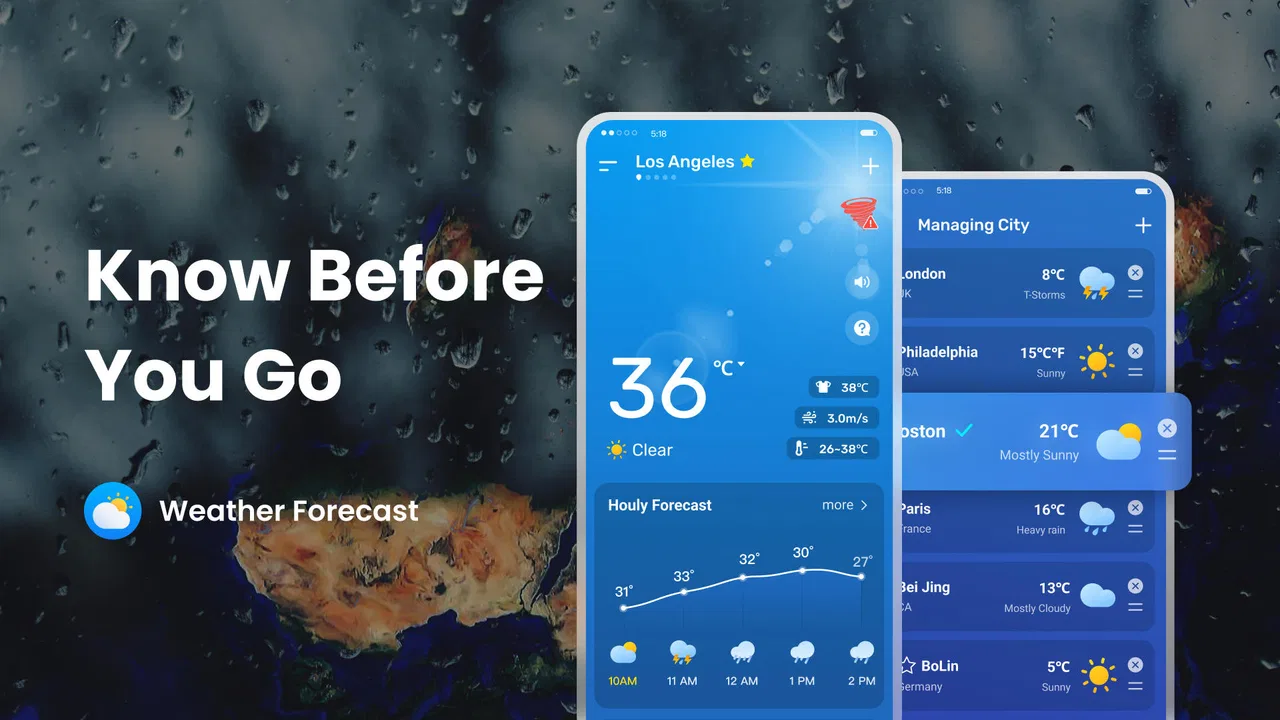
Weather Forecast - Live Alerts sits more comfortably in the middle. It is a dedicated weather app rather than a simple glance at a notification, but it does not ask me to turn an ordinary morning decision into a research session. The store summary, “Weather Forecast — Know Before You Go,” captures the practical idea behind it without requiring me to treat the app as a specialist meteorology instrument. I open it to make a decision, not to study every atmospheric detail.
That distinction is important for people who check the weather several times a day. A commuter may need one answer before leaving and another before returning. A parent may want to decide whether outdoor clothes are sensible for a child. Someone working outdoors may need a broader view before accepting a job or scheduling a break. In these situations, the value is not merely showing weather information; it is helping me reach a decision with less friction.
I also appreciate that the app is aimed at a broad audience. Its content rating is Everyone, and the minimum operating-system requirement is Android 7.0, which makes it approachable for people who are not using a recent phone. That matters because a weather utility should not feel reserved for expensive or newly updated devices. If an older phone still handles everyday apps comfortably, this is the kind of tool that can remain useful without demanding a major change in habits.
The first setup should be treated as a routine, not a project
My advice is to set it up at a calm moment rather than during a rushed departure. The first useful test is simple: choose the place where you actually spend most of your time, then compare what you see with the conditions outside. This is more useful than immediately adding every location you might visit someday. A weather app becomes faster when the most relevant place is the one that appears naturally when I open it.
I would also decide what kind of information I personally need before judging the app. If my routine is mostly commuting, I care about the day ahead and whether conditions are likely to interfere with walking or transport. If I plan outdoor activities, I need to look beyond the current moment and consider how the weather may change while I am away. The app is easier to evaluate when I measure it against a real decision instead of asking whether it contains every feature found in larger services.
There is a useful habit here: check the forecast at the moment a plan is made, then check it again shortly before leaving. The first look helps with planning; the second protects me from relying on an old assumption. I do not interpret a forecast as a promise, especially when weather is changing quickly. I use it as a reason to adjust clothing, timing, or backup plans. That mindset prevents a weather app from creating false confidence.
The current version is 1.0.5, so I approach it as a relatively focused utility rather than a mature platform with years of accumulated extras. That can be a positive if I want a cleaner experience, but it also means I would not choose it solely because I expect the breadth of a long-established weather service. The right question is whether its direct approach suits my routine.
How I use it during an ordinary day
My most common scenario starts before work. I check the app while preparing breakfast, not because I want a detailed forecast briefing, but because I want to avoid making three separate decisions later. If the conditions look unsuitable for a light jacket, I choose something more practical immediately. If rain appears likely, I take an umbrella before leaving rather than hoping the walk will stay dry. The time saved comes from combining those decisions in one short check.
A second scenario is a short trip across town. The weather at home may not be the only thing that matters, especially when I will be outside for the return journey. I use the app before departing to think about the whole outing rather than the next ten minutes. That small change in timing is one of the most useful habits I took from using it: the forecast is more valuable when it is connected to the duration of my plan.
For errands, the app helps me decide whether to group several stops together. If the weather looks comfortable, I can walk between them and avoid unnecessary transport. If conditions seem unpleasant, I can finish the essential task first and postpone the optional one. That is not a dramatic feature, but it is a realistic way a weather tool saves time and reduces annoyance.
It is also useful before outdoor exercise, although I would be cautious about treating a general forecast as a safety system. For a casual walk, the information can help me choose suitable clothing and a sensible time. For a longer hike, cycling route, or activity where exposure matters, I would want a more specialized service with detailed local information and dependable alerts. Weather Forecast - Live Alerts is best used as a practical first check, not as the only source for a high-consequence decision.
Travel planning is another good fit, particularly for short journeys where packing decisions are easy to get wrong. I can use the app to think about what I will need during the day rather than packing for every possible condition. The trade-off is that a general weather app cannot remove the uncertainty that comes with changing conditions or different locations. I still prefer to leave room for a backup plan instead of assuming that one forecast will remain perfect.
Where the app removes small points of friction
The biggest improvement is mental rather than technical. Instead of searching through a browser, opening a general news service, or waiting for a widget to refresh, I have a dedicated place to check. That matters when I am already handling keys, bags, messages, and transport times. A weather app earns its keep when it shortens the path between “I wonder what it is like outside” and “I know what I am going to do.”
I also find value in using a consistent checking routine. I look once when I begin planning, once before leaving if the day is important, and again only when conditions are genuinely uncertain. Without a routine, it is easy to refresh weather information repeatedly without gaining a better decision. The app can reduce that habit because it gives me a clear reason to check: clothing, timing, travel, or an outdoor plan.
The live-alert idea is most useful when it supports attention without becoming a distraction. I would rather receive information that helps me reconsider a plan than constantly monitor the sky myself. At the same time, I do not assume every alert deserves an immediate change. I treat an alert as a prompt to look again and decide, especially if I am already indoors or the event is not relevant to my route.
One non-obvious advantage of a focused weather app is that it can make decisions more consistent across a household. If several people are preparing for the same outing, a quick shared check can settle whether coats, umbrellas, or alternative timing make sense. That is less about forecasting perfection and more about avoiding the familiar conversation in which everyone has a different impression of the day.
Another useful workflow is to check the app before committing money or time to an outdoor plan. I would not cancel an important event based on a single glance, but I might choose an indoor alternative, change the start time, or prepare a backup route. This is where the app’s value becomes practical: it helps me make a small adjustment early, when changing plans is easy, rather than reacting after the weather has already disrupted them.
What I would not expect from it
My main caution is that convenience should not be confused with complete weather analysis. People who want detailed radar interpretation, extensive historical comparisons, specialist aviation information, or highly technical planning tools may be happier with a larger weather platform. Those services often justify their extra complexity when a forecast needs close examination. I would not install this app expecting it to replace every specialized weather source.
I would also skip it if I need a weather tool mainly for severe outdoor work or remote travel. In those cases, the cost of missing an important change can be much higher than the inconvenience of using a more detailed service. A simple forecast check is appropriate for ordinary routines, but it should not be the only preparation for situations involving exposure, difficult terrain, or limited access to shelter.
Another trade-off is that a focused interface may feel less satisfying to users who enjoy exploring weather maps and layers. Some people want to compare locations, inspect patterns, and follow storms visually. If that is the part of weather apps I enjoy most, a richer alternative will probably feel more rewarding. This app makes more sense for someone who values speed and clarity over a long list of controls.
I also recommend judging the app by how quickly it helps with a decision, not by how many times it can be opened. Repeated checking can become a habit without improving accuracy. My best results came from connecting each look to a specific action: change clothes, carry protection from rain, move an appointment, or keep the original plan. That is a small but important discipline, and it prevents the utility from becoming another source of phone distraction.
Who will get the most from it
I think this app is a strong match for people who want a straightforward weather forecast before commuting, running errands, walking, or arranging casual outdoor plans. It is especially suitable for users who find large weather apps overwhelming and built-in widgets too shallow. The free price removes the need to make a financial commitment before testing whether the routine fits.
Its reach is already visible in the fact that it has passed one hundred thousand installs, while its average rating is 4.6 from over three hundred ratings. I read that as encouraging evidence that the basic experience works for many users, though I would still treat ratings as a starting point rather than a substitute for trying it with my own schedule. A weather app can be highly useful to one person and unnecessary to another depending on location, routine, and tolerance for detail.
The developer, RODRIGUEZCASTILLO FABIOLA, has kept the product positioned as an accessible utility rather than a complicated professional tool. That makes the app easy to recommend to a friend who simply wants to know whether leaving home requires a little more preparation. It is less easy to recommend to someone who already depends on advanced forecasting services and expects every possible layer in one place.
For families, older Android phones, students, and busy commuters, the combination of free access and a low minimum system requirement is practical. I would be comfortable suggesting it as a first weather app for someone who wants a dedicated check without learning a complex interface. I would not suggest replacing a specialist source when the decision involves safety, remote travel, or serious work outdoors.
My verdict after making it part of a routine
Weather Forecast - Live Alerts succeeds when I use it for what it is: a quick way to reduce uncertainty before I go out. It saves time by bringing the forecast into the moment when a decision is needed, and it removes the friction of switching between generic search results, widgets, and more crowded weather services. The best benefit is not a dramatic new capability; it is fewer avoidable mistakes in ordinary planning.
Its limitations are equally clear. Users who want deep analysis, specialist warnings, or an expansive collection of visual tools should choose a more advanced alternative. I also keep my expectations realistic because forecasts can change and no app can guarantee that a plan will stay dry or comfortable. The app is most reliable as a planning aid, not as permission to ignore changing conditions.
For my everyday use, the balance is sensible. I can open it before leaving, make a clothing or timing decision, and get on with the day instead of repeatedly wondering whether I prepared correctly. Since it is free and rated for Everyone, there is little barrier to testing it on an Android device that meets the Android 7.0 requirement. The real strength is the time it gives back by turning a vague weather worry into one quick, actionable check.
FAQs for Weather Forecast - Live Alerts
01What features does Weather Forecast - Live Alerts offer?
Weather Forecast - Live Alerts provides real-time weather updates, detailed forecasts, and live alerts for severe weather conditions. It includes hourly and weekly forecasts, radar maps, and widgets for easy access. Users can customize notifications and choose specific locations for personalized weather tracking.
02Is Weather Forecast - Live Alerts free to use?
Yes, Weather Forecast - Live Alerts offers a free version with basic features such as current weather updates and daily forecasts. However, there is a premium subscription available that unlocks additional features like ad-free usage, advanced radar options, and extended forecast data.
03How accurate are the weather forecasts in Weather Forecast - Live Alerts?
Weather Forecast - Live Alerts uses data from reputable sources like meteorological agencies and satellite systems to provide highly accurate forecasts. The app updates frequently to ensure real-time accuracy, and users can rely on it for precise weather predictions and timely severe weather alerts.
04Can I customize alerts in Weather Forecast - Live Alerts?
Yes, users can customize alerts in the app to receive notifications about specific weather conditions. You can set alerts for severe weather events, temperature changes, or precipitation forecasts in selected locations. This feature helps users stay prepared for any weather changes that might affect their plans.
05Does Weather Forecast - Live Alerts work offline?
Weather Forecast - Live Alerts requires an internet connection to update weather data and provide accurate forecasts. However, once the data has been downloaded, you can access the most recent information offline. For real-time alerts and updates, ensure your device is connected to the internet.
Pros
- Accurate real-time weather updates.
- User-friendly interface and design.
- Customizable alerts for severe weather.
- Covers global locations effectively.
- Detailed hourly and weekly forecasts.
Cons
- Contains ads in the free version.
- Limited features without premium.
- Requires internet for updates.
- Battery consumption can be high.
- Occasional notification delays.

Weather Forecast - Live Alerts
Gallery